
Every inquiry lands in your pipeline — not a spreadsheet
Website forms, walk-ins, partner agents, and imports all create leads in one CRM. Your counselors see new prospects instantly and follow up while they're still warm.
3×
faster lead response
0
copy-paste from email
1
pipeline for every channel
New
Quoted
Converted
Why agencies lose leads before counselors even see them
Education and migration consultancies juggle inquiries from every channel. Without a connected system, hot prospects go cold.
Inquiries get lost
Problem: A student fills out your website form. It sits in an inbox until someone copies it into Excel — if they remember.
Solution: Public inquiry forms create a lead profile and pipeline entry instantly. Status: New. Ready for a counselor.
Channels are scattered
Problem: Facebook DMs, walk-ins, partner referrals, and website leads live in different places. No one sees the full picture.
Solution: Website API, manual CRM entry, agent portal, and CSV import all feed the same lead list with source tagging.
Slow handoff kills conversions
Problem: By the time a counselor sees the inquiry, the prospect has already messaged two other agencies.
Solution: Assign counselors, set follow-up dates, and work from a shared pipeline — not forwarded emails.
How your agency captures leads today
Whether a prospect finds you online, walks into your office, or comes through a partner agent — every inquiry becomes a trackable lead in edazent.
Prospect on your website
Your agency website → CRM in seconds
Connect your website contact or inquiry form to the edazent Public API. When a prospect submits, a lead profile and pipeline entry are created automatically.
What gets captured
- Full name
- Email or phone
- Business interest (education / service)
- Notes / message
New
Quoted
Converted
Your website and CRM share one database
Update a programme fee once in your CRM. It appears on your agency website. A student inquires. A lead appears in your pipeline. No copy-paste. No lost inquiries.
Public API endpoint
POST /api/v1/public/inquiriesConnect your website contact form, landing pages, or custom integrations. Each submission creates a lead with status New.
- Name, email or phone, and inquiry notes captured automatically
- Business interest tagged (education, service, or both)
- Rate limiting and optional CAPTCHA protect against spam
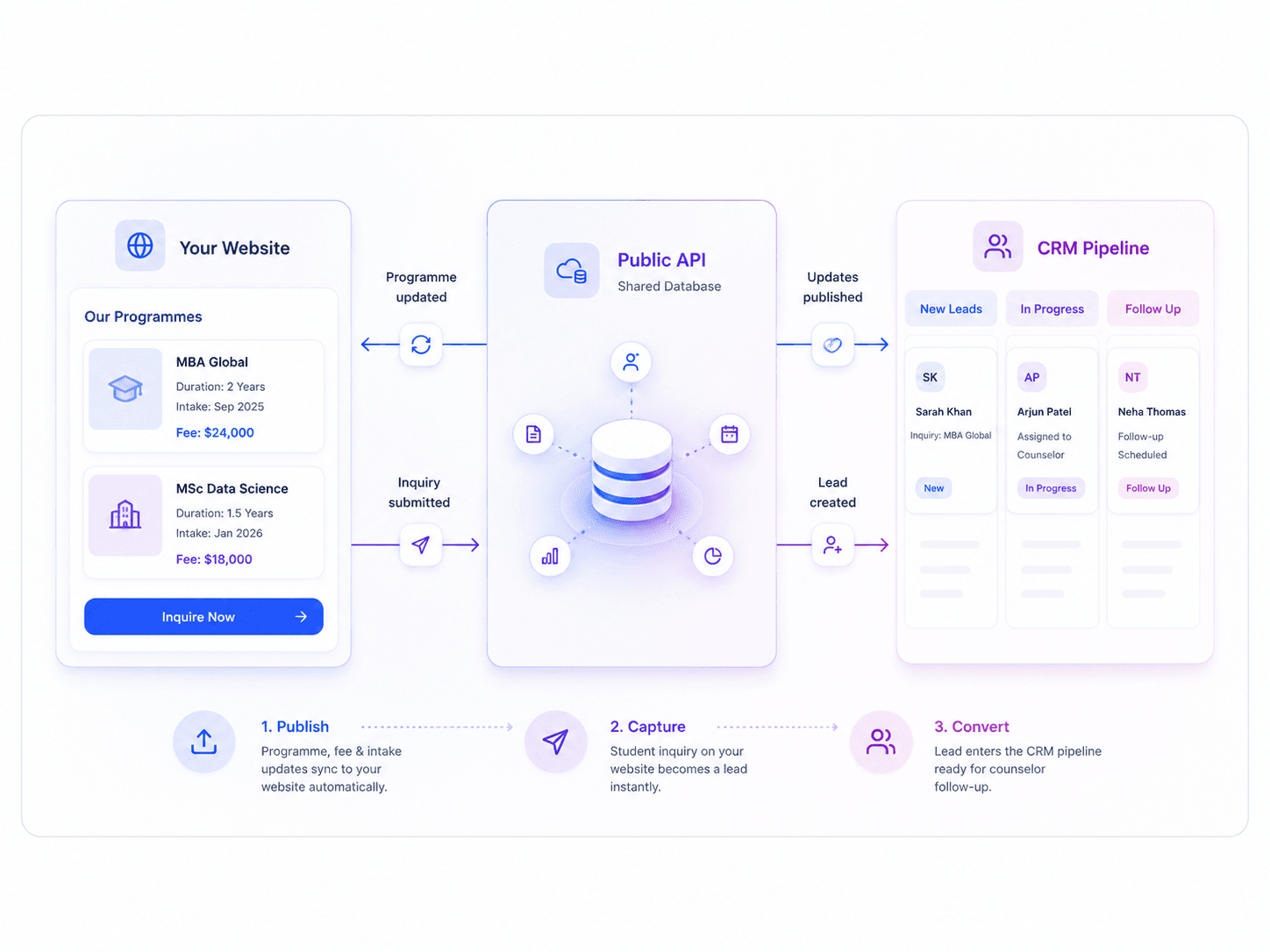
What happens when a lead arrives
Every capture method follows the same path — into your CRM pipeline, ready for counselors to work.
Inquiry arrives
Website form, agent portal, manual entry, or CSV import creates a lead with status New.
Tag & assign
Staff set lead source, link campaigns, assign a counselor, and schedule the first follow-up.
Enrich the profile
Counselors complete study interest, programme preferences, documents, and quotation details in the wizard.
Convert to student
When the lead is ready, convert to a student and start applications — no re-entering data.
Enrich every lead with the full picture
A website inquiry captures the basics. Your counselors complete the rest — study preferences, documents, fees, and timeline — in a guided multi-tab wizard.
When a counselor opens a lead, the intake wizard adapts to your enabled modules — education, service, or both.
Tab: Profile
Contact details, nationality, passport, and address.
- ✓Full name
- ✓Phone & email
- ✓Nationality
- ✓Passport & DOB
Sidebar: Lead source, campaign, assigned counselor, agent, branch, follow-up date, and status — all in one place.
How each role uses lead capture
edazent is designed for the way education agencies actually work — owners, counselors, front desk, and partner agents.
Agency owner
Scenario: You spend on Facebook ads but can't tell which campaigns produce enrolled students.
With edazent: Define lead sources and campaigns. See which channels fill your pipeline and convert — invest in what works.
Counselor
Scenario: You have 40 active leads and three new inquiries arrived while you were in a meeting.
With edazent: New leads appear in your queue with contact details and notes. Set follow-ups, send quotations, and hand over when needed.
Front desk
Scenario: A family walks in asking about UK master's programmes. You need to capture everything quickly.
With edazent: Create a lead in minutes with the intake wizard. Assign a counselor and schedule a callback before they leave.
Sub-agent
Scenario: Your partner in Kathmandu refers students but needs visibility without accessing your full CRM.
With edazent: Agent portal for lead submission, application tracking, and commission earnings — attributed to their account.
Source tracking and campaign attribution
Capturing the lead is step one. Knowing which channel and campaign produced it helps you invest marketing budget wisely.
Lead sources
Define channels — Website, Facebook, Walk-in, Referral, Partner — and tag every lead for ROI reporting.
Learn moreCampaigns
Create marketing campaigns with UTM fields. Link leads to campaigns when counselors work the pipeline.
Learn moreDuplicate detection
Run duplicate detection reports to catch the same prospect entered twice — before two counselors call them.
Learn moreProtected public inquiry endpoints
Your website forms are public-facing. edazent includes inquiry guard settings so you control spam and abuse without blocking real prospects.
- Rate limiting on public inquiry endpoints
- Optional CAPTCHA for spam protection
- Role-based access — agents see only their leads
- Encryption in transit and at rest
Inquiry guard settings
Agency success story
“edazent helped us monitor all leads and clients in a structured manner. Exceptional sales and support service.”
— Md. Kamal Hossain, CEO at BMW Education Consultancy
3× lead organization
See how small agencies use edazent →Lead capture: spreadsheets vs edazent
See how connected lead capture compares to the manual process most agencies start with.
Manual / Spreadsheets
1/8
features covered
Generic CRM
2/8
features covered
edazent
7.5/8
features covered
| Feature | Manual | Generic CRM | edazent |
|---|---|---|---|
| Lead pipeline CRM | |||
| Application lifecycle tracking | Spreadsheets | Basic | Full wizard + stages |
| Institution & programme database | |||
| Document rules engine | |||
| Website ↔ CRM sync | |||
| Commission income pool & payout schemes | Excel | ||
| Student portal | Add-on | ||
| Agent portal |
Swipe horizontally to compare features
14 capabilities purpose-built for education & migration agencies.
View full comparisonOne connected system
Your agency website, office CRM, and client portals — one system, one database
Website inquiries, walk-ins, and partner leads all land in the same CRM pipeline — no copy-paste.
Stop losing leads to spreadsheets
Connect your website, onboard your counselors, and capture every inquiry in one pipeline. Explore free with Pocket Agent and our live demo — contact us for full agency setup.
- Pocket Agent free to explore
- Live demo for every portal
- Onboarding when you're ready
Why agencies switch
10
Agency partners
20+
Platform modules
2
Office locations
Free
Pocket Agent
Education & migration agencies in Bangladesh, Malaysia, and Australia trust edazent.